
Log in
HELP / EASYPROPCRM

How to add and find property contacts

Learn how to add a property contact, search records and browse contacts by suburb and estate.

EasyPropCRM
EASYPROCRM WORKSPACEYour property people
NDNomsa DlaminiTenant · Unit 12
LSLerato SitholeLandlord · Unit 21
SNSipho NkosiBuyer · Unit 08
People. Places. Next steps.
Explore the interface
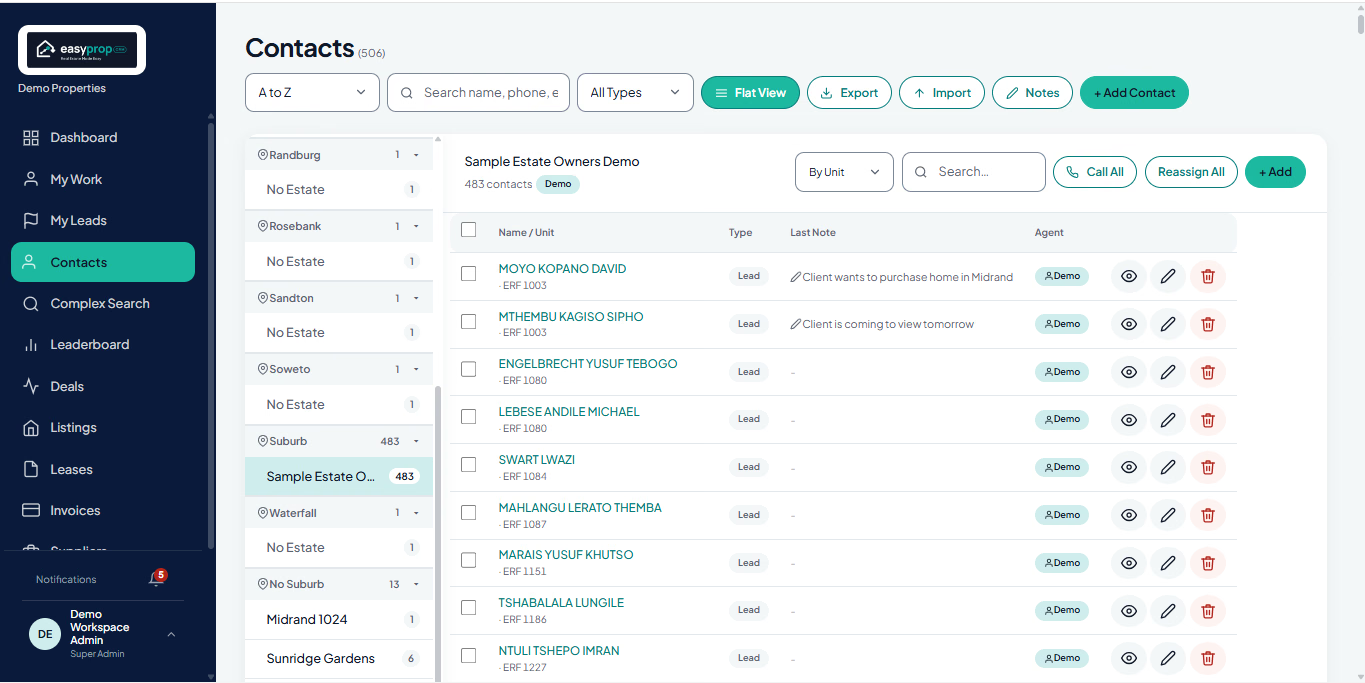
Contacts by estate and suburb

EasyPropCRM product interface

EasyPropCRM contacts organised by suburb and estate, with assigned agents and call actions.
PROPERTY WORKFLOW / EASYPROPCRM
THE PRACTICAL DETAILS

How does this work in practice?

A practical guide, one question at a time.

Which fields are needed for a useful contact record?

In Contacts, add their name and the details you have permission to store: role, phone/email, suburb, estate or complex, unit/ERF and assigned agent. Save, then check the record in the relevant estate view.

How do you search by suburb, estate or person?

Search by name or other known details, or browse suburb → estate. Use the list view for a wider search.

Where do contact notes and FICA status appear?

Open the full profile to log activity and check the contact's FICA status and document entries.

GOOD TO KNOW

Frequently asked questions

Short answers to the questions that come up after the main details.

Explore the help centre
Can I find a contact by phone number?+

The guide describes search by name, phone, email, unit, ERF and ID number. Search only within records your role may access.

Can I change a contact's assigned agent?+

Authorised admins can reassign a single contact or a whole estate. Agent workspace.

WHEN YOU'RE READY

Ready to see your property workflow?

One subscription for deals, billing, admin and portal syndication. See how EasyPropCRM fits your agency with a focused demo.
