 Log in
Real estate CRM calling, bulk SMS and email
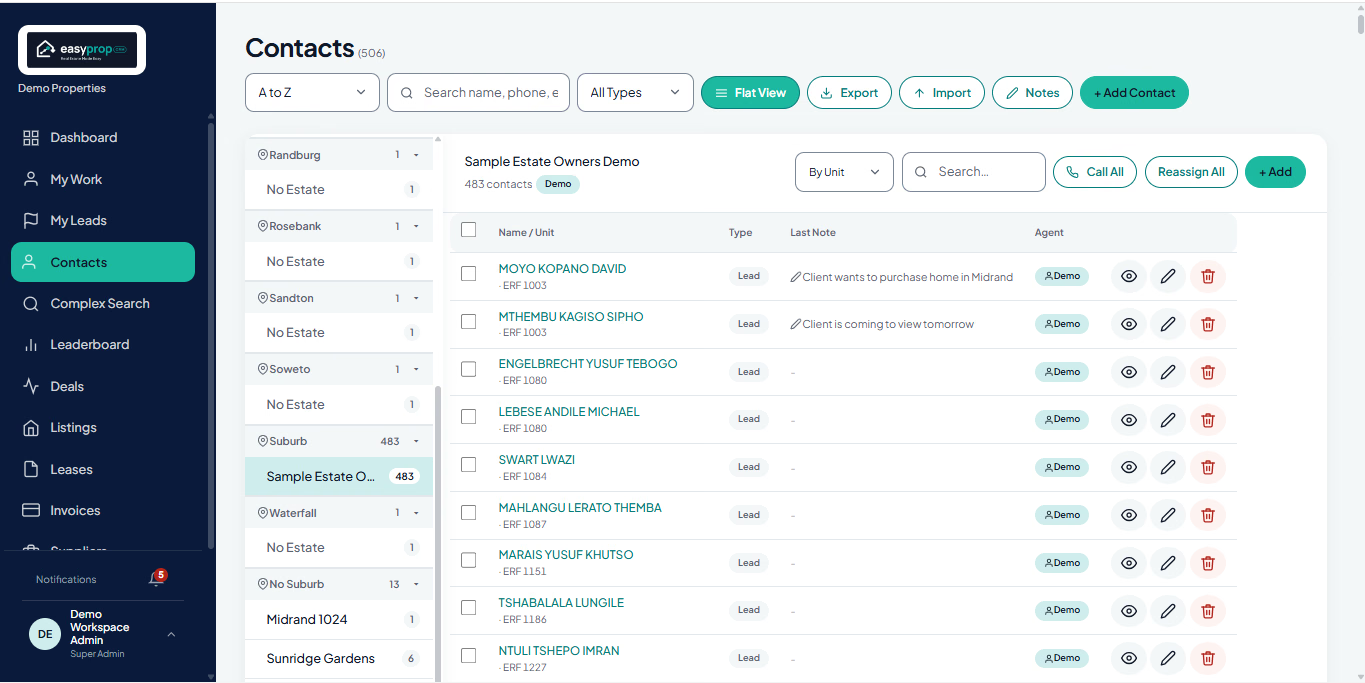
Move from a property record to the right conversation. EasyPropCRM combines app calling, bulk messaging and callback planning with the agency’s contact workflow.
Calling, SMS & email: the essentials for your property team
Call from the CRM with automatic call logging.
Reach a relevant estate, landlord group or buyer list through planned SMS and email communication.
- Choose a channel that fits the task.
- Review the audience and message before a bulk send.
- Budget separately for calling minutes and SMS messages.
What does communication inside a property CRM add?
Communication is most useful when the person sending it understands the contact’s current position. A landlord waiting for an update, a buyer arranging a viewing and a tenant discussing a renewal need different information. Starting from the property record helps the agent prepare the conversation and record what happened afterwards.
EasyPropCRM includes app calling, bulk SMS, bulk email and callback invitations. Those channels sit alongside contacts, estate grouping and daily agent work. The goal is to keep outreach connected to useful context, with the next action visible to the team rather than trapped in an agent’s memory.
How does app calling support an agent’s work list?
App calling lets an agent call from the CRM, with the call logged automatically in the calling workflow. Before making the call, review the contact’s role, location and recent notes. This is especially useful when working through an assigned estate list and moving from one person to the next.
After the call, record the business outcome: access confirmed, valuation requested, buyer still considering, or another clear result. Automatic logging records activity but does not replace the note explaining the conversation. Calling is billed per minute, so the agency should review its expected use and confirm the configured service before rolling it out to the whole team.
How should an agency prepare a bulk SMS or email?
Start with the purpose and the intended audience. A message about a specific estate should reach the relevant contacts, while a landlord update or buyer opportunity needs a different group. Review the selected recipients and remove contacts that should not receive that communication under the agency’s permission and preference process.
Write a message with one clear point and a practical next action. Check dates, property references and contact details before sending. For a larger campaign, review a sample internally so that formatting or wording problems are caught early. Bulk communication makes distribution easier; it does not make an irrelevant message useful or establish permission to send it.
When should the team call, send an SMS or email?
A call suits a conversation that needs clarification, such as understanding a buyer’s objection or discussing a landlord’s options. An SMS can suit a brief update when that channel is appropriate for the recipient. Email gives more room for a structured explanation, supporting detail or a follow-up the person may need to refer back to.
Use the person’s current need and the agency’s agreed communication practice to choose the channel. Avoid sending the same message through every channel merely because each is available. If the topic involves sensitive documents or financial changes, use the agency’s approved process and verify the relevant details before sharing them.
How do callback invitations connect to communication?
A conversation often creates another commitment: a viewing confirmation, a later call or a discussion after the client has reviewed information. Record that next action while the details are fresh. The callback reminder workflow includes calendar invitations for the agent and client, helping make the planned time explicit.
Check the recipient, time and description before relying on the invitation. Delivery depends on the configured service, and sending an invitation does not establish that the recipient accepted it. For important arrangements, follow the agency’s usual confirmation process. Update the plan when the appointment changes so that notes, reminders and communication do not contradict one another.
What communication setup and costs should an agency review?
The subscription includes communication workflows, with app calling charged per minute and bulk SMS charged per message. Website, social media management and marketing services are separate optional add-ons. Keep those distinctions clear when budgeting: using the CRM’s messaging tools is different from commissioning a managed marketing campaign.
During onboarding, confirm the sender configuration, connected services, available controls and the process for handling unsuccessful delivery. Use an authorised internal recipient to test a call-related record, an SMS, an email and a callback invitation. Train staff on audience review and outcome notes before inviting them to send larger communications to live client lists.
Keep the conversation with the contact
Agents call from EasyPropCRM and every call is logged against the contact with full call transcription. The next person working on that relationship can see the conversation in context.
Bulk SMS and bulk email let your team reach an estate, landlords or a buyer list in one send. Callback reminders send calendar invites to both the agent and the client. Calling is billed per minute and bulk SMS per message.
How should a property agency plan its communication costs?
The CRM connects app calling, bulk SMS and bulk email with agency contacts. Calls are logged with full transcription against the contact, while bulk messages can reach an estate, landlord segment or buyer list. Choose the audience carefully and review the message before sending so a convenient bulk action still reflects the relationship and purpose.
Calling is charged per minute and bulk SMS per message. Ask for current rates and agree the configured sending services before rollout. Estimate use by the number of calling agents and the audiences you expect to contact, not simply the number of CRM logins. Full trial access to the core package is not a promise of unlimited free communication usage.
Write an email from the contact record
A property communication workflow
Choose the audience and purpose
Identify the person or relevant contact group. Check the current context, communication preferences and the specific result the agency wants the message to achieve.
Select the appropriate channel
Use a call for a conversation, SMS for suitable brief updates or email for more detailed communication. Review the configured sender and any usage charges.
Check and communicate
Verify names, property references, dates and recipient selection. For bulk communication, review a sample before completing the live send.
Record the response and next step
Add the useful outcome to the contact workflow. Schedule a callback or update the related deal or lease when the conversation creates further work.
Choose a communication channel deliberately
| Channel | Suitable purpose | Key check |
|---|---|---|
| App call | Discuss a requirement or unresolved question. | Context before calling and an outcome note afterwards. |
| Bulk SMS | A concise update to a relevant audience. | Recipient selection, permission process and message cost. |
| Bulk email | A fuller update or structured information. | Audience, content accuracy and sender configuration. |
| Calendar invitation | A planned callback or appointment. | Recipient, time and subsequent confirmation. |
- Confirm sender details and connected services during setup.
- Review calling and SMS usage charges.
- Agree how staff select and review recipient groups.
- Test messages and invitations with authorised internal recipients.
- Train agents to record outcomes after automatically logged calls.
- Set a clear process for delivery issues and preference changes.

Calling, SMS & email FAQs
Short answers to the questions that come up after the main details.
Explore the help centreAre calling and SMS included in the base monthly price?+
The communication workflows are available in EasyPropCRM, with app calling is billed per minute and bulk SMS per message. Review expected use and the current commercial terms when setting up the agency. Optional managed marketing services are quoted separately.
Does automatic call logging record the business outcome?+
The app-calling workflow logs the call automatically. Staff should still add a useful note explaining the response, decision and next action. A call record alone cannot tell a covering colleague whether a viewing was confirmed or an unresolved question still needs attention.
Can an agency message a particular estate or buyer list?+
Bulk communication supports estate groups, landlords and buyer lists. Confirm how the audience is selected in the current account and inspect the recipients before sending. The agency remains responsible for its permission, preference and appropriate communication process.
Does the CRM send calendar invites to clients?+
The callback workflow includes invitations to the agent and client. Confirm the account’s calendar and email setup and test the recipient experience during onboarding. A sent invitation is not the same as acceptance, so use an appropriate confirmation process for important appointments.
What should be demonstrated before a communication rollout?+
Follow one contact from its record through a call, a useful outcome note and a callback. Then review a small permitted recipient group for SMS or email. Check sender configuration, message costs, delivery handling and how the team deals with preference changes.
How should a property agency plan its communication costs?+
The CRM connects app calling, bulk SMS and bulk email with agency contacts. Calls are logged with full transcription against the contact, while bulk messages can reach an estate, landlord segment or buyer list. Choose the audience carefully and review the message before sending so a convenient bulk action still reflects the relationship and purpose.
See calling, sms & email in EasyPropCRM
Bring a workflow from your agency. Explore the records, responsibilities and next actions with an EasyPropCRM demo or a full-access free month.
