 Log in
A real estate agent CRM workspace for assigned contacts
Give each agent a focused place to start the day. My Work brings assigned property contacts, local context and follow-ups into a practical working routine.
Agent workspace: the essentials for your property team
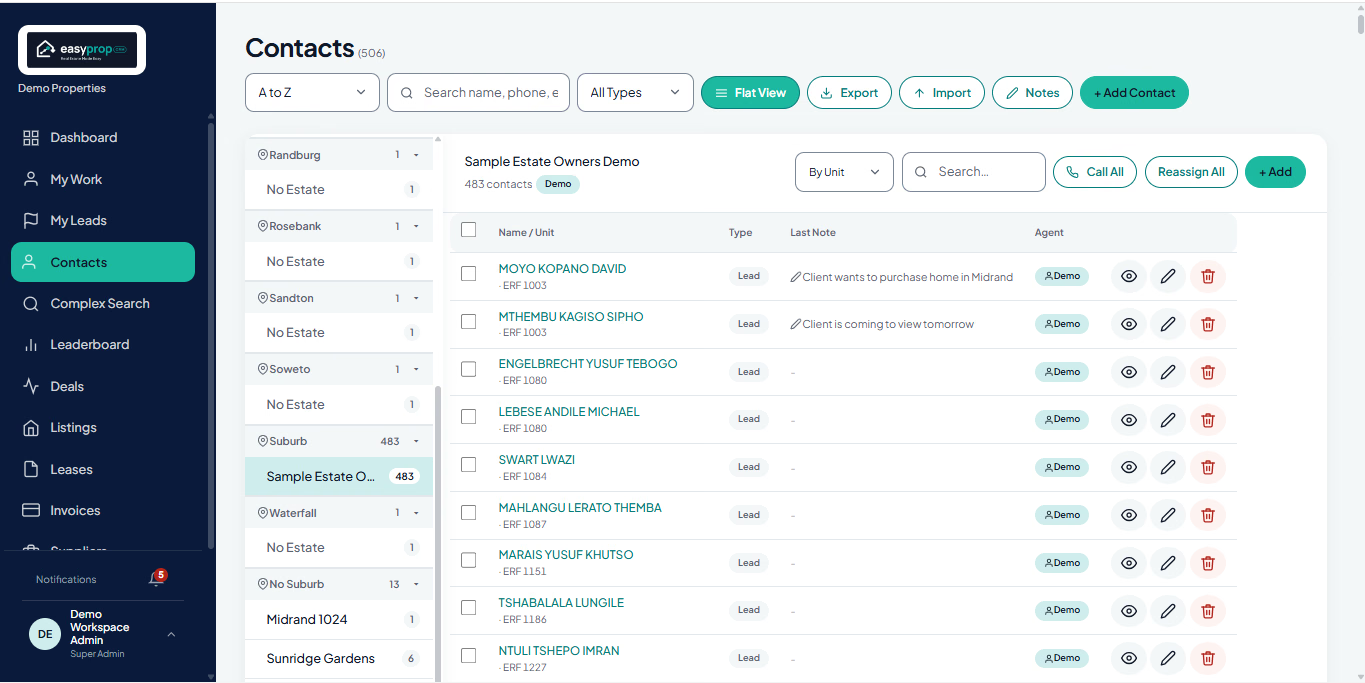
See the contacts assigned to your account in estate or list view.
Record useful outcomes before moving to the next conversation.
- Start with assigned contacts.
- Keep conversation notes and next actions together.
- Continue through the work list with context.
What is the EasyPropCRM agent workspace?
The agent workspace is the daily working area for people responsible for property conversations. My Work focuses on contacts assigned to the agent, helping them begin with the records they are expected to handle. Agents can use estate context or a contact list to locate a person and review the relevant information.
The purpose is practical: know who you are speaking to, understand what happened previously and leave the next action clear. A manager’s wider reporting view serves a different task. My Work helps the agent carry out the individual conversations that keep contacts, deals and lease follow-ups current across the agency.
How should an estate agent prepare a daily work list?
Begin with the commitments already made: a buyer expecting viewing confirmation, a landlord waiting for feedback or a tenant due a renewal discussion. Check the dates and notes on those contacts before adding more calls. An assigned record tells you who is responsible, but the latest conversation explains what should happen.
Use the estate view when location is the most useful organising principle and list view when you need a particular person. If expected contacts are missing, raise the assignment with an administrator. A duplicate record is a poor workaround because it can leave the original history and the new conversation in separate places.
How can agents keep property conversations in context?
Open the contact and read enough history to avoid asking the person to repeat information already supplied. Confirm their role and property context, then focus on the unresolved question. A viewing enquiry, a lease discussion and a document follow-up require different preparation even when they concern the same complex.
Afterwards, record what changed and what remains open. Include the agreed next action, responsible person and date where relevant. EasyPropCRM’s communication features include app calling with automatic call logging, while the contact note should still explain the business outcome. A logged call establishes activity; it does not by itself explain whether the client’s question was resolved.
What does a useful next action look like?
A next action should tell the agent what to do when they return to the record. “Call the landlord on Thursday to confirm Saturday access” is clearer than “follow up”. If the next step depends on another person, include that dependency in the note so the agent does not mistake silence for completion.
EasyPropCRM supports dated reminders and callbacks, with calendar invitations in the configured callback workflow. Keep the schedule realistic and update it when plans change. After documenting the current conversation, agents can continue through their working list using the Next action. The routine works best when notes are added while the details are still fresh.
How does an agent workspace help between viewings?
EasyPropCRM is mobile-friendly, so an agent can use the working list while away from the office. Before travelling, identify the records needed for the day and check the contact details. Between appointments, add the viewing outcome and any agreed follow-up instead of relying on a later reconstruction from memory.
Mobile access still requires an appropriate connection and authorised sign-in. It does not mean the product includes an offline mode or that every task is best performed on a small screen. Detailed import reviews and large reporting comparisons may be more comfortable at a desk, while short contact updates fit naturally into field work.
How should managers introduce My Work to a team?
Agree how contacts will be assigned, what a sufficient activity note looks like and who handles temporary cover. Ask one agent to work through a small real portfolio before expanding the process. An administrator can resolve missing assignments and confirm the areas each role should access during onboarding.
Training should follow a complete conversation: find the contact, review context, record the outcome and schedule the next step. Then test a handover to a colleague. This reveals whether notes are understandable to someone who did not make the original call. The subscription includes setup and training; agency-specific working conventions still need an accountable owner.
How can agents keep work moving between the office and viewings?
EasyPropCRM's mobile-friendly workspace is part of the core subscription. An agent can review assigned contacts and the next action in a browser between appointments, while office colleagues continue working with the shared agency records. An internet connection is required; mobile-friendly access should not be confused with an offline working promise.
A practical routine is to review the contact before calling, record the outcome immediately afterwards and set the next commitment while the details are fresh. Calling from the CRM keeps the call logged against the contact, with full transcription. Use the transcript as context and check important commitments before acting on them. Calling remains a separately charged usage service.
A daily agent workflow
Review commitments
Check the contacts and follow-ups already assigned to you. Start with promised actions and time-sensitive conversations before planning additional outreach.
Open the relevant record
Confirm the contact’s role, location and recent notes. Prepare the specific question that needs an answer rather than starting a conversation without context.
Record the outcome
Add what the person said, what was agreed and any open issue. Update the relevant deal or lease if its status changed.
Set the next action and continue
Schedule the next task where needed, then move through the list. If ownership has changed, ask an administrator to review the assignment.
Match the agent’s task to the working area
| Task | Working context | Useful outcome |
|---|---|---|
| Prepare a callback | Contact notes and reminder | The agent knows what to discuss. |
| Cover an estate | Assigned estate view | Relevant contacts can be worked through consistently. |
| Progress an offer | Deal record | Commercial stage reflects the latest development. |
| Review a tenancy | Lease and contact | Dates and the next renewal discussion are clear. |
- Confirm the correct contacts appear in My Work.
- Agree when estate view and list view are most useful.
- Use notes that explain outcomes rather than activity alone.
- Give promised callbacks a date and clear purpose.
- Check mobile access before a day of appointments.
- Arrange an authorised process for leave and reassignment.

Agent workspace FAQs
Short answers to the questions that come up after the main details.
Explore the help centreDoes My Work show every contact in the agency?+
My Work focuses on the contacts assigned to the current account. What a user can access also depends on their role. If an expected person is missing, check list view and ask an administrator to review the assignment rather than creating another record.
Can agents use EasyPropCRM on a phone?+
The product is mobile-friendly and supports contact work between appointments. Use a suitable connection and the agency’s authorised account. During a demo, try the actual tasks your agents perform on phones, such as reading notes, recording a viewing outcome and scheduling a callback.
Are phone calls logged automatically?+
The app-calling workflow logs calls automatically. Calling is charged per minute in addition to the subscription. Agents should still record the conversation’s outcome and next action, because a call entry alone does not capture the decision made or the work still outstanding.
How should another agent cover a colleague’s contacts?+
Ask an authorised administrator to review assignments and access for the period of cover. The original notes should explain current commitments, relevant property context and pending actions. Test that the covering agent can find the necessary records before the handover begins.
What is the best first training exercise?+
Use one representative contact with an upcoming conversation. Have the agent find the record, explain its context, add a realistic outcome and set a next action. Then ask a colleague to interpret the updated record to check that the handover is understandable.
How can agents keep work moving between the office and viewings?+
EasyPropCRM's mobile-friendly workspace is part of the core subscription. An agent can review assigned contacts and the next action in a browser between appointments, while office colleagues continue working with the shared agency records. An internet connection is required; mobile-friendly access should not be confused with an offline working promise.
See agent workspace in EasyPropCRM
Bring a workflow from your agency. Explore the records, responsibilities and next actions with an EasyPropCRM demo or a full-access free month.
