 Log in
A real estate deal pipeline for sales and rentals
Follow each property opportunity from the first conversation to its recorded outcome. Keep deal stages, amounts and agent responsibilities visible in one working pipeline.
Deal pipeline: the essentials for your property team
Configure stages around the process your agency actually follows.
Review commission assumptions alongside the deal before relying on an estimate.
- Use stages with clear entry criteria.
- Keep deal values and commission assumptions distinct.
- Record the next action and the eventual outcome.
What is a property deal pipeline?
A property deal pipeline organises opportunities according to where they are in the agency’s process. A new enquiry, an offer under discussion and a signed agreement need different actions. The pipeline gives those differences a visible structure so agents and managers can review progress without reconstructing every conversation.
EasyPropCRM supports sale, rental and commercial deal context, assigned agents and configurable stages. The agency can use stages that match its own process rather than treating every opportunity as identical. A stage is still a recorded operational status: it should describe the work accurately, and it does not independently prove a signed agreement, transfer or receipt of money.
How should an agency configure property deal stages?
Choose stages that correspond to meaningful changes in the work. Agree what must be true before a deal moves forward and who is responsible for updating it. “Offer received” and “agreement signed” should not be interchangeable if the team needs to distinguish negotiation from an executed contract.
Keep the structure understandable enough for agents to maintain during a busy day. Too few stages hide useful differences; too many can encourage inconsistent updates. Review the workflow with both sales and rental colleagues, and ask during setup how the available configuration should accommodate their processes. Document the agency’s definitions outside individual agents’ personal habits.
Which details should a property deal contain?
A useful deal record identifies the opportunity, primary contact, type, assigned agent, current stage and relevant commercial amounts. The title should be recognisable in a review meeting, such as a property reference or clear transaction description. Record the next follow-up in the appropriate activity workflow rather than expecting the title to carry the whole story.
Use working values carefully. An asking price, offer amount and agreed transaction value can represent different facts at different moments. Update the relevant amount when the underlying position changes and make assumptions clear in notes. Managers should be able to understand which number is being reviewed before adding it to a wider pipeline discussion.
How do property commission calculations fit the pipeline?
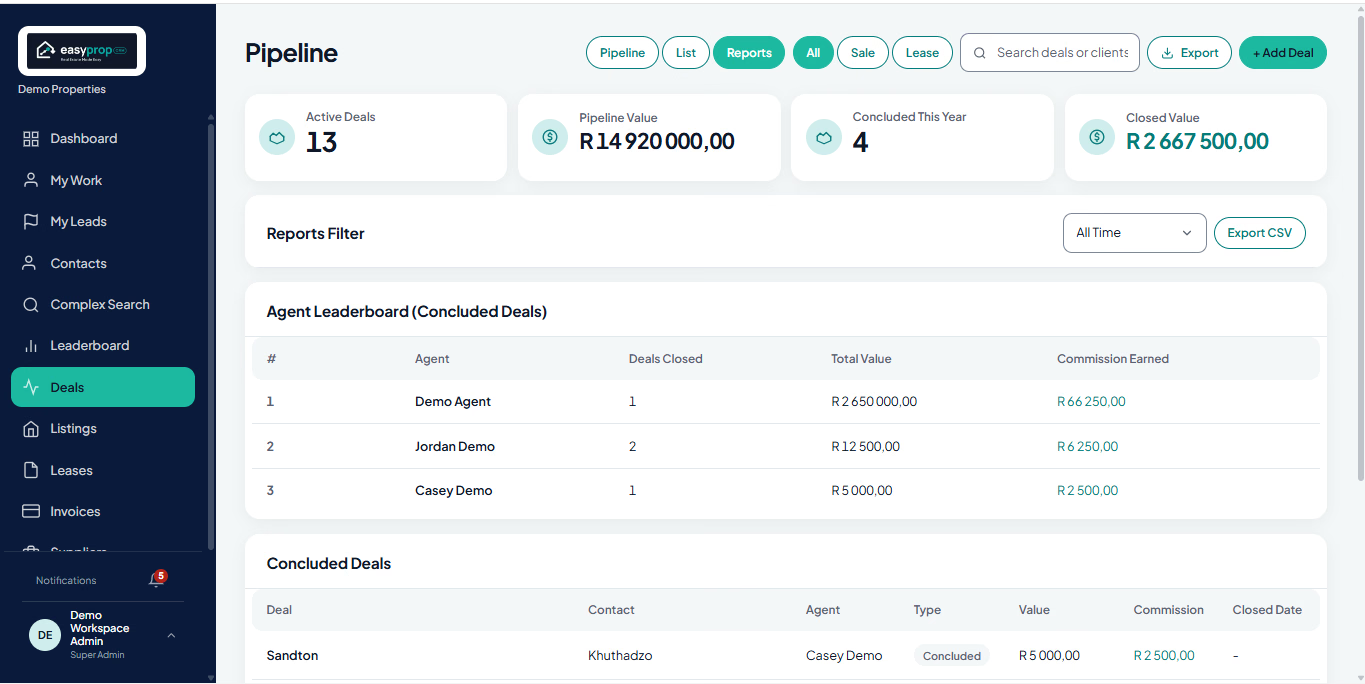
EasyPropCRM includes commission calculations and splits that reflect agency and agent shares. These help the team review the commercial picture alongside the opportunity. The result depends on the amounts, rates and split assumptions entered, so the quality of those inputs matters as much as the calculation itself.
For a simple planning example, a R1,500,000 sale at a 5% commission rate produces R75,000 before any applicable tax or additional adjustments. A 50% agent share of that base would be R37,500. Actual agreements may use a different basis. Review the mandate, tax treatment and split terms before treating a CRM estimate as an amount payable.
How should managers review an agency pipeline?
Start with exceptions that require action: opportunities with unclear ownership, an outdated stage or no useful next step. Ask what has changed since the last review and which decision is needed to move the work forward. A long list of open deals is not automatically a strong pipeline if those records are no longer current.
Use the dashboard and available reports as a starting point, then inspect the underlying deal when a figure needs explanation. Keep property value, potential commission and received income separate in the conversation. An opportunity can have a large headline value while still requiring substantial work before any revenue is earned or payment is received.
How do closed and lost deals improve record quality?
When an opportunity concludes, update the recorded outcome instead of leaving it indefinitely in an active stage. Closed work and work that did not proceed need to be distinguishable for later review. Where appropriate, keep a factual note about the outcome and any separate contact follow-up that remains relevant.
A lost opportunity does not mean the person’s contact record should be deleted. The buyer may return later, or the landlord may need another service. Keep the person’s context while closing the particular piece of work accurately. During onboarding, agree how the agency will review stale deals and who can correct commercial details after a handover.
How do deals, commission splits and invoicing work together?
EasyPropCRM includes commission calculations, agency and agent splits, and invoicing within the same core package. This keeps the commercial side of a sale close to the deal instead of leaving it in a separate spreadsheet after the opportunity has moved forward. The principal can review the pipeline with the underlying fee assumptions in mind.
For a practical handover, review the agreed sale amount and commission basis, check the split, and confirm which amount belongs on the invoice before sending it. The stage of a deal is a progress signal, not proof that money has been received. Keep the deal outcome and the invoice's payment position distinct so reporting can explain both the sales work and the outstanding billing.
Follow a property sale, from enquiry to outcome
An example sales journey for your agency. Select a stage to explore the records and next actions; configure your pipeline around your own process.
Give the opportunity an owner
Start with the person, property and reason for the enquiry. A clear owner gives the next conversation somewhere to go.
THE RECORD TO KEEP
- Buyer or seller contact and property context
- Assigned agent and working transaction value
YOUR NEXT ACTIONS
- Capture the opportunity in the deal record
- Record a follow-up and confirm the next conversation

Separate the numbers in a property deal
| Measure | What it describes | What it does not prove |
|---|---|---|
| Property value | The recorded transaction or working amount. | Commission earned by the agency. |
| Commission estimate | The result of entered fee assumptions. | A final entitlement or payment received. |
| Agent share | The calculated portion under a split assumption. | That every condition for payout is satisfied. |
| Recorded stage | The agency’s current operational status. | Signed documents or bank settlement on its own. |
- Define what each stage means before rollout.
- Identify an owner for every active opportunity.
- Review the difference between asking, offer and agreed values.
- Check commission rates, split bases and tax treatment.
- Close stale or lost work accurately.
- Compare report totals with the underlying deal records.

Deal pipeline FAQs
Short answers to the questions that come up after the main details.
Explore the help centreCan EasyPropCRM use the agency’s own pipeline stages?+
Yes. EasyPropCRM includes configurable pipeline stages. Start with clear business milestones and agree when agents should update them. Use a demo to check how your sales and rental processes fit the available configuration before finalising the team’s working definitions.
Does a closed deal mean the commission has been paid?+
No. A recorded deal outcome and an actual payment answer different questions. Review the signed agreement, relevant invoice and payment record before confirming money received or an agent payout. Keep pipeline progress and financial settlement distinct in the agency’s review process.
Can the CRM calculate agent commission splits?+
EasyPropCRM supports commission calculations and splits. Check the transaction amount, rate, split basis and any tax or adjustment assumptions before relying on the result. Bring a representative agency agreement to a demo with identifying information removed so the calculation can be reviewed in context.
Should a rental enquiry be recorded as a deal or a lease?+
Use a deal to track the opportunity and commercial progress. A lease records the agreed tenancy, dates, rent and relevant fees once that work is established. The contact identifies the person across the workflow. Avoid using one record type as a substitute for all three.
What makes a pipeline report misleading?+
Outdated stages, duplicate opportunities, unclear values and records that should have been closed can distort the picture. Agree regular record reviews and inspect the source deals behind unusual totals. A report is most useful when the team shares consistent definitions and keeps the underlying work current.
How do deals, commission splits and invoicing work together?+
EasyPropCRM includes commission calculations, agency and agent splits, and invoicing within the same core package. This keeps the commercial side of a sale close to the deal instead of leaving it in a separate spreadsheet after the opportunity has moved forward. The principal can review the pipeline with the underlying fee assumptions in mind.
See deal pipeline in EasyPropCRM
Bring a workflow from your agency. Explore the records, responsibilities and next actions with an EasyPropCRM demo or a full-access free month.
