 Log in
Organise real estate contacts by estate and suburb
See your working area as a portfolio of suburbs, estates and units. EasyPropCRM helps agents find property contacts in the location context that matters to the next conversation.
Estate & suburb view: the essentials for your property team
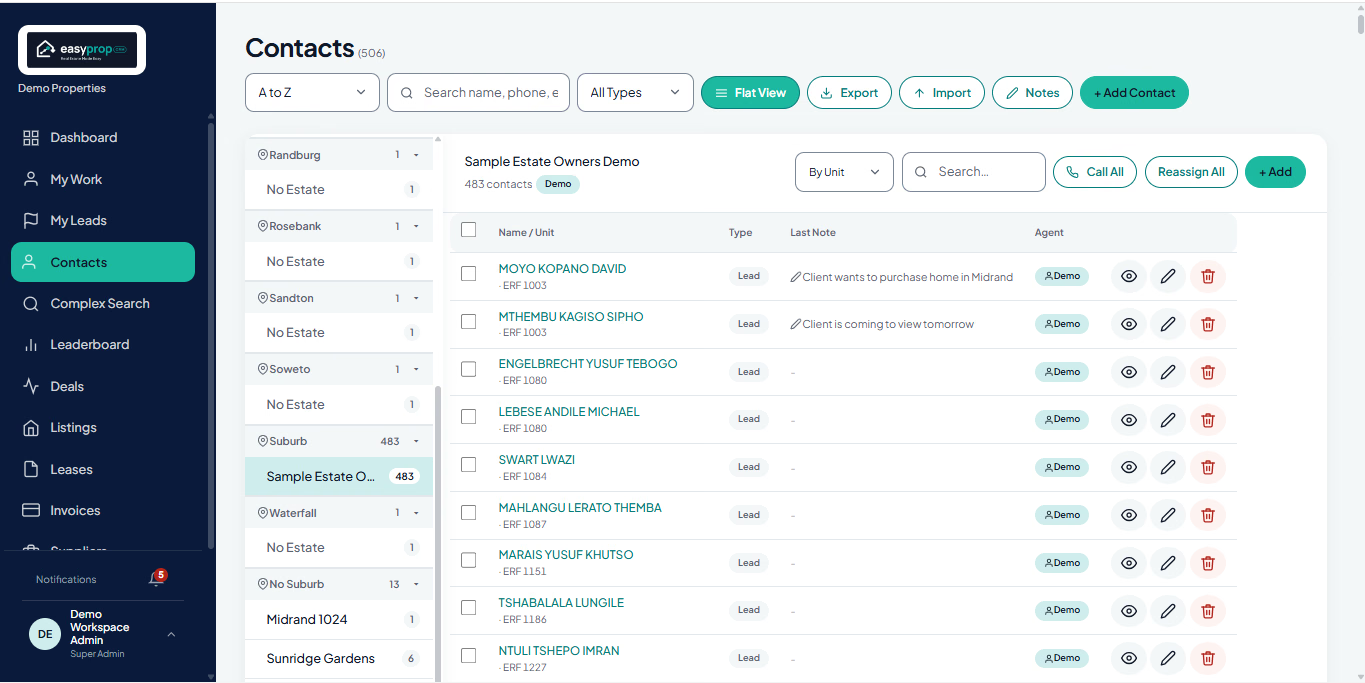
Move from a suburb to an estate, then to the relevant contact.
Switch to a contact list when a name or number is your better starting point.
- Give location fields a consistent structure.
- Work through an estate without losing the person’s context.
- Use assignment to clarify who covers each contact.
What is an estate and suburb CRM view?
An estate and suburb view organises contacts around the places an agency works. Instead of treating every person as an isolated row, it lets an agent begin with a neighbourhood, open a complex or estate and locate the relevant unit or ERF. The contact remains a person’s record, with location providing a useful way to find it.
This reflects how many property conversations start: a landlord in a familiar complex, a buyer interested in a specific suburb or a tenant at a known unit. EasyPropCRM supports this location-led approach alongside a conventional contact list. The two views serve different starting points within the same agency workflow.
How should an agency structure estate and unit information?
Use suburb for the wider area, estate or complex for the named development, and unit or ERF for the more specific reference. Agree a naming convention before imports grow. “Willow Ridge”, “Willowridge” and “Willow Ridge Estate” may describe one place to an experienced agent, but inconsistent capture makes the portfolio harder to browse.
Preserve the identifiers your team actually uses and check them against the relevant property information. Avoid filling unknown locations with guesses. A buyer looking across several suburbs may need their preferences explained in notes rather than being assigned a false residential address. Decide during onboarding how your agency will handle contacts whose working area differs from their own property.
How does estate-based canvassing work in EasyPropCRM?
An agent can use the assigned estate view to work through contacts in a familiar complex, open the person’s record and check previous notes before making contact. The useful result of that conversation is an updated record and a next action where needed. The Next action in the agent workflow helps move through the working list.
Good canvassing records distinguish “not available”, “asked for a callback” and “interested in a valuation”. Those outcomes need different responses. Keep the note and follow-up specific to the person. A portfolio structure is a way to organise work; it does not establish permission to contact everyone in an estate or replace the agency’s communication rules.
How do estate views support agent coverage?
Territory knowledge is valuable, but a location alone does not identify who should follow up. Combine estate grouping with contact assignment so that each agent can see the people they are expected to work on. Administrators should check the actual records included in a working list when responsibilities change.
For example, two agents might know the same complex but handle different contacts or different types of work. Agree the ownership before a campaign begins and resolve overlap through the agency’s administrator. Do not assume an estate view is a live map, an exclusive territory engine or proof that no other agent has a related opportunity.
What makes location data useful over time?
Review location information when a contact moves, a property is renamed or a previously incomplete record becomes clearer. Small corrections matter because an estate view depends on the fields used to group records. Ask the person maintaining imports to use the same naming rules as agents capturing new enquiries.
Check a sample by searching from both directions: find a known person by name, then find that same record through the suburb and estate. If one route fails, investigate the location values or assignment before adding a duplicate. Keep a short agency reference of preferred estate names so that daily capture does not recreate the same inconsistencies.
Where do estate views fit in a property CRM?
Estate views are especially helpful for agents with recurring work in complexes, rental portfolios concentrated in a few areas and teams taking over an existing local database. They give structure to contact discovery. Listings still hold property inventory and availability; deals track opportunities; leases record the agreed tenancy and its dates.
Use a demo to follow a realistic location-based task all the way through. Ask to find a contact in an estate, review notes, schedule a callback and return to the working list. If your agency needs mapping, route optimisation or a special territory rule, discuss that requirement explicitly rather than assuming it follows from estate grouping.
How does estate grouping help agents work from the field?
Agents canvassing a complex need the property context as well as a phone number. Consistent estate names and unit or ERF identifiers help them work through the area without rebuilding the list each morning. Combine the location view with assignment and a clear next action so colleagues can understand which relationships are being worked.
Mobile-friendly access lets an agent review the list between viewings in a connected browser. After a call, record the outcome and the next contact date rather than relying on memory. The same record then supports the office team when a conversation develops into a listing, deal or lease. Location grouping helps organise work; it does not guarantee a mandate or a sale.
From suburb to a useful property conversation
Choose the working area
Start with a suburb and estate relevant to the day’s work. Check the assigned contact list reflects the portfolio you are responsible for.
Locate and review the contact
Use the unit or ERF as context, then confirm the person’s identity, role and previous notes before acting on the record.
Record the property conversation
Capture the actual outcome, whether it is a viewing request, a valuation discussion or a request to call later. Avoid treating every conversation as a new deal.
Continue with a clear next step
Set a dated follow-up when one is agreed, then continue through the list. Switch to contact search when a name or number is more useful.
Choose the view that fits the task
| Starting point | Useful view | What to verify |
|---|---|---|
| A named complex | Estate view | The contact’s estate and unit are recorded consistently. |
| A person’s telephone number | Contact list | The number belongs to the correct person. |
| The day’s assigned work | My Work | Assignment matches the agent’s responsibilities. |
| A property available to market | Listings | Current availability and listing details are accurate. |
- Agree one preferred name for each suburb and complex.
- Check unit and ERF values against the agency’s source records.
- Separate known location facts from buyer preferences.
- Assign active contacts before reviewing agent work lists.
- Test both estate browsing and full contact search.
- Confirm additional mapping requirements during a demo.

Estate & suburb view FAQs
Short answers to the questions that come up after the main details.
Explore the help centreIs estate view a map of every property in a suburb?+
It is a way to organise the contacts recorded in your agency’s workspace by suburb, estate and unit context. Do not treat it as a complete municipal property register or a live geographic map. The quality of the view depends on the records your team maintains.
Can agents work unit by unit in a complex?+
The estate and unit structure supports that style of contact work. Check each person’s role and history, record the outcome and use the assigned working list to continue. Consistent unit references help prevent confusion where one complex contains similar street or building names.
Why does a contact appear under the wrong estate?+
Check the contact’s recorded suburb and estate values, including spelling variations introduced during an import. Also verify that you are viewing the expected workspace and assigned records. Correct the source information through an authorised user rather than adding a second version of the contact.
Can the team still use a normal contact list?+
Yes. Estate grouping complements list view. A list is useful when the person’s name, email or phone number is known, while estate browsing suits location-led work. During setup, practise both approaches so agents can choose whichever gets them to the right record.
What should an agency prepare before using estate views?+
Bring a representative list of suburbs, estate names and unit formats, together with proposed agent assignments. Check the same sample after migration. This helps the team agree practical capture rules before a growing database makes inconsistent naming more difficult to correct.
How does estate grouping help agents work from the field?+
Agents canvassing a complex need the property context as well as a phone number. Consistent estate names and unit or ERF identifiers help them work through the area without rebuilding the list each morning. Combine the location view with assignment and a clear next action so colleagues can understand which relationships are being worked.
See estate & suburb view in EasyPropCRM
Bring a workflow from your agency. Explore the records, responsibilities and next actions with an EasyPropCRM demo or a full-access free month.
