 Log in
Real estate CRM reporting for deals and team activity
Use current agency records to understand work, results and exceptions. EasyPropCRM brings a live dashboard and property reports into the same system the team uses each day.
Reporting: the essentials for your property team
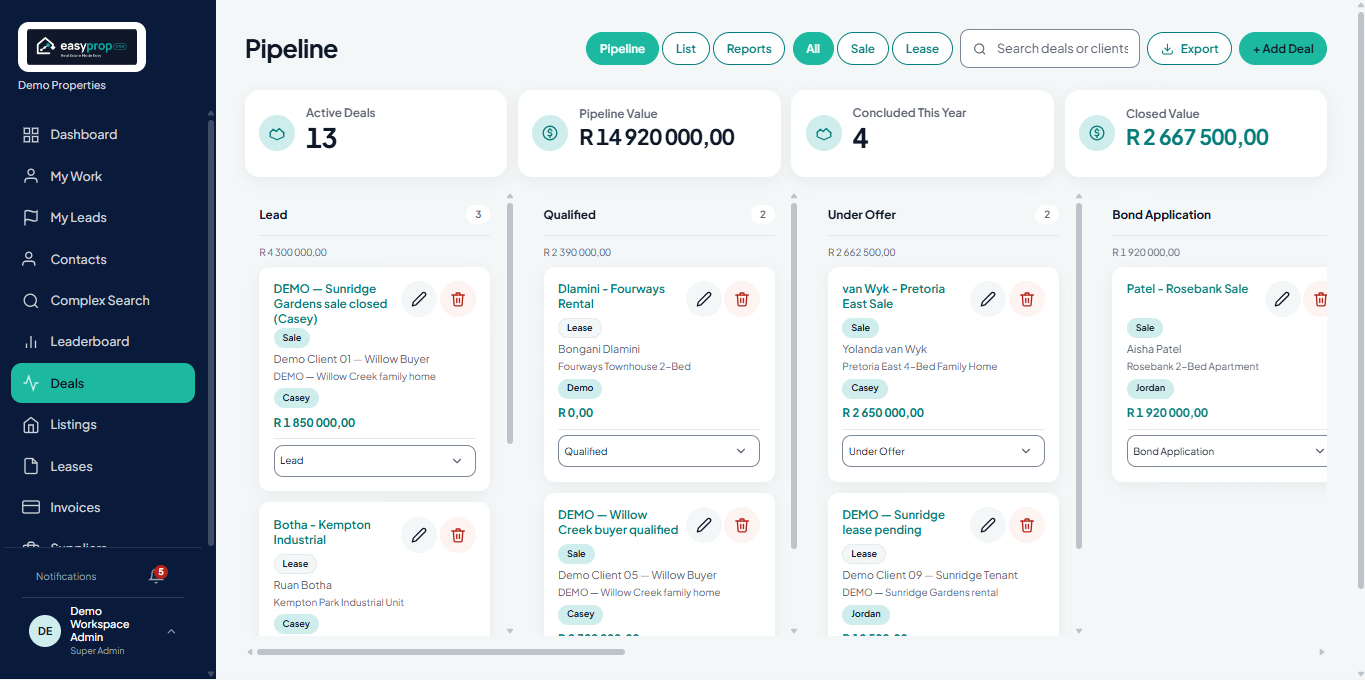
Review pipeline value, closed deals and outstanding invoices with their source records.
Export sales and lease reports to Excel for the agency’s own review process.
- Define each measure before comparing it.
- Keep source records current.
- Use reports to identify questions and next actions.
What should real estate CRM reporting help you understand?
Agency reporting should answer practical management questions: what work is open, what has concluded, where a payment needs attention and which records require a closer review. A report is most useful when it supports a decision, such as following up an overdue account or checking whether an opportunity is still active.
EasyPropCRM includes a live dashboard showing pipeline value, deals closed and outstanding invoices, together with sales and lease reports and an agent leaderboard. These views draw meaning from the records the team maintains. They help managers inspect the agency’s work, but a visually strong chart cannot compensate for outdated stages, incorrect amounts or unclear definitions.
How should managers read the property CRM dashboard?
Start by identifying what each number represents and the period or scope being reviewed. Pipeline value, closed deal counts and outstanding invoices describe different aspects of the business. A manager should be able to explain the underlying measure before comparing it with another figure or using it in a planning discussion.
Use an unexpected dashboard result as a reason to inspect the source records. A jump in pipeline value may come from one large opportunity; an outstanding balance may include an item that needs payment review. Check the relevant deal or invoice rather than assuming the dashboard itself explains why the number changed.
How do sales and pipeline reports support decisions?
Sales and pipeline reports help the team review the recorded opportunities and outcomes. Agree what counts as an active opportunity, what the stages mean and when work should be marked closed or lost. Consistent definitions make a review meeting more useful because agents are describing comparable positions.
Keep property value distinct from potential commission and money actually received. A sale can have a high transaction value while the agency’s fee is much smaller, and a closed deal does not establish that a payment has arrived. Use the financial records for payment questions and the deal records for commercial progress. This avoids turning one headline total into several unsupported conclusions.
What should a lease report be used to review?
A lease report can support the agency’s understanding of its recorded tenancy portfolio. Begin with accurate lease dates, current rent and the relevant fees or status information available in the report. Use the view to locate records that need operational follow-up, then inspect the individual lease for its supporting detail.
A report should not be treated as a substitute for the signed agreement. If a date or amount looks unusual, compare it with the underlying record and document before taking action. During onboarding, ask to demonstrate the exact lease questions your agency needs to answer so the available fields and exports can be matched to the review process.
How should an agent leaderboard be interpreted?
An agent leaderboard offers a way to compare recorded performance within the product’s available measures. Before using it for coaching or commercial decisions, confirm what is being counted, the relevant period and how assignments affect the result. Different roles and portfolios can produce different patterns of activity and outcomes.
Use the figures to begin a conversation rather than reduce an agent’s contribution to one number. A person covering a difficult renewal portfolio may have a different working pattern from someone focused on new sales. Review context and record quality, and avoid treating a single activity count as proof of service quality or a complete measure of performance.
How do Excel exports fit an agency reporting routine?
EasyPropCRM includes sales and lease reports exportable to Excel. An export can support a management meeting, a focused comparison or a handover to the person responsible for further analysis. Check the report selection and available fields before using the file in a separate workbook.
Record the reporting period and keep the exported file under the agency’s access rules. If someone adds calculations or corrections outside the CRM, distinguish that analysis from the underlying source records. For a recurring review, agree who prepares the report, who resolves discrepancies and which changes need to be made back in the CRM so next month’s figures remain useful.
Your corporate brand and your insights
Use your logo, colours and banking details on invoices and emails. A live dashboard shows pipeline value, closed deals and outstanding invoices.
Export sales and lease reports to Excel and use the agent leaderboard to see team activity in context.
How can managers connect pipeline value, fees and outstanding invoices?
EasyPropCRM's dashboard brings pipeline value, deals closed and outstanding invoices into the management view. Sales and lease reports can be exported to Excel, and an agent leaderboard adds activity context. Review these together to understand which work is progressing and which billing still needs attention.
A useful weekly review separates an opportunity's value, fees calculated on the deal and amounts actually recorded as paid. Ask who owns the next action on each exception rather than treating a dashboard total as a complete explanation. Exports support further analysis, but should be dated and handled as snapshots. Optional bookkeeping and tax services remain separate from the included CRM reporting tools.
Explore your invoice reports
A reporting routine that leads to action
Prepare the source records
Ask the team to update relevant stages, lease details and payment records before the review. Resolve obvious ownership gaps and stale work.
Define the question
Choose the dashboard or report that fits the decision. Confirm the measure, period and scope before interpreting a total or comparing agents.
Investigate exceptions
Open the underlying records behind unusual values or outcomes. Separate a data-quality issue from a genuine business change that needs action.
Assign and follow through
Give the agreed follow-up an owner and date. Export the relevant report where needed, and correct source records so the next review reflects the work.
Different measures answer different questions
| Measure | Management question | Interpretation limit |
|---|---|---|
| Pipeline value | What value is recorded in open opportunities? | It is not cash received or guaranteed revenue. |
| Deals closed | Which opportunities have a recorded completed outcome? | The stage does not independently confirm payment. |
| Outstanding invoices | Which billed items still show an outstanding position? | Check payment matching and the underlying account. |
| Agent leaderboard | How do the available recorded measures compare? | Review role, portfolio and assignment context. |
- Agree stage and outcome definitions with the team.
- Check which period and records a report includes.
- Separate transaction value, commission and received money.
- Investigate unusual totals in the source records.
- Review agent comparisons in the context of their roles.
- Keep exported files controlled and corrections reflected in the CRM.

Reporting FAQs
Short answers to the questions that come up after the main details.
Explore the help centreWhich figures are included on the dashboard?+
EasyPropCRM includes pipeline value, deals closed and outstanding invoices. Confirm the available filters and reporting definitions in your current account during setup. Use each figure with its underlying records so the team understands what it represents and what it does not.
Can reports be exported to Excel?+
Sales and lease reports are exportable to Excel in EasyPropCRM. Check the selected report and available fields before using the output for further analysis. Keep the reporting period clear and handle exported personal or financial information under the agency’s access rules.
Does pipeline value predict revenue?+
Pipeline value describes the recorded value of opportunities. It should not be treated as guaranteed revenue or cash received. Check the stage, value basis and commission assumptions separately, and use invoices and payment records when the management question concerns actual money.
Can a leaderboard be used to compare agents fairly?+
It can support a discussion when the measure, period and assignment rules are understood. Review differences in portfolios, responsibilities and source-record quality. A single leaderboard number should not be treated as a complete assessment of an agent’s service, judgement or contribution.
Why might a report disagree with an agency spreadsheet?+
Check the reporting period, included records, stage definitions and whether one source has more recent changes. Review the specific rows behind the difference rather than changing a total manually. Agree which records must be corrected and who owns the ongoing reporting process.
How can managers connect pipeline value, fees and outstanding invoices?+
EasyPropCRM's dashboard brings pipeline value, deals closed and outstanding invoices into the management view. Sales and lease reports can be exported to Excel, and an agent leaderboard adds activity context. Review these together to understand which work is progressing and which billing still needs attention.
See reporting in EasyPropCRM
Bring a workflow from your agency. Explore the records, responsibilities and next actions with an EasyPropCRM demo or a full-access free month.
