 Log in
Real estate contact management for your agency
Keep the person, their property context and the next conversation together. EasyPropCRM gives your agency a practical contact record for leads, buyers, landlords and tenants.
Contact management: the essentials for your property team
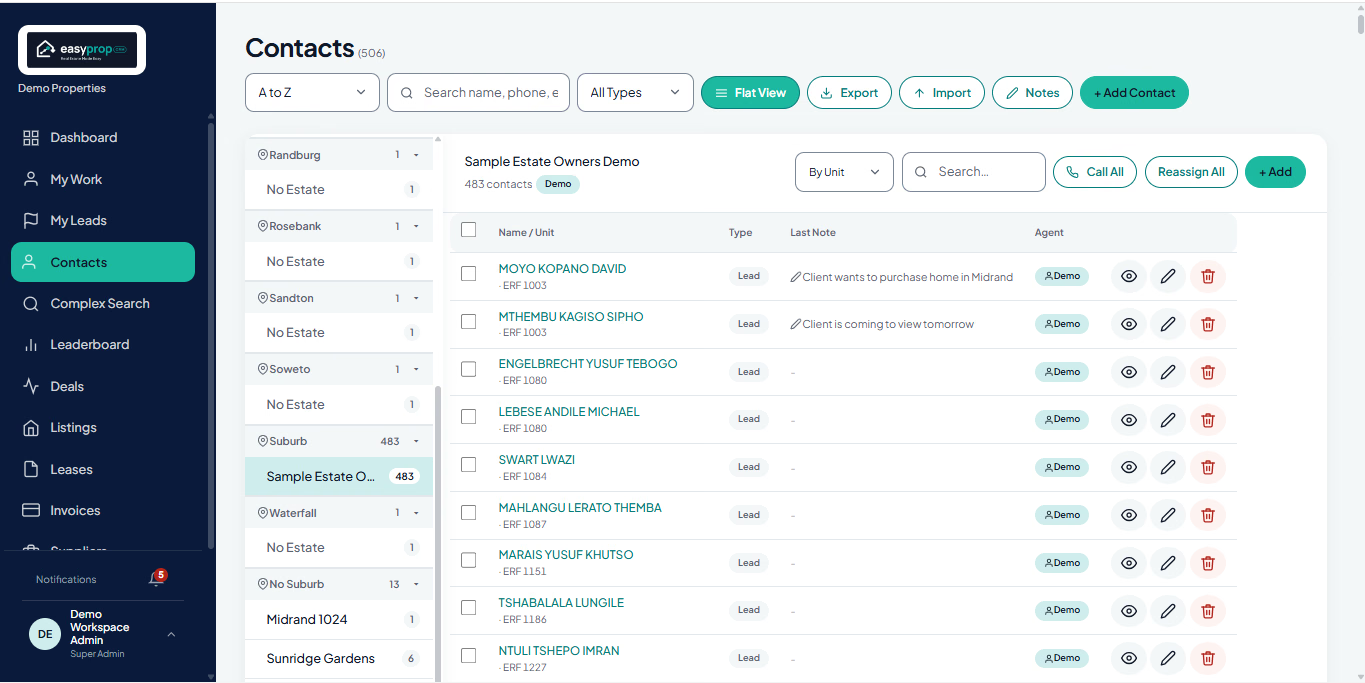
Search by a person’s details or browse their suburb and estate.
Give colleagues the context needed to continue a conversation without starting again.
- Organise people by role and location.
- Make ownership and the next action clear.
- Use a shared record across property workflows.
What is property contact management?
Property contact management is the work of keeping accurate information about the people involved in an agency’s business: who they are, how to reach them, which property area matters and what needs to happen next. A name and telephone number are useful, but they rarely explain why an agent should call today.
EasyPropCRM combines contact details with role, suburb, estate or complex, unit or ERF and agent assignment. That context helps distinguish a buyer enquiry from a tenant renewal or a landlord discussion. The record becomes a working reference for the team, with notes and related activities supporting the next action.
Which details belong in a property contact record?
Begin with the information your team needs to recognise the person and continue the work: name, phone, email, contact role and property location. Use consistent estate names and unit identifiers so that colleagues searching from different starting points reach the same record. Record an assigned agent where ownership is clear.
Keep factual notes that explain the conversation and any agreed follow-up. Separate a person’s current requirement from an assumption; an enquiry about a rental does not necessarily make that person a current tenant. Collect only details relevant to your agency’s purpose and follow your own process for permission, accuracy and handling personal information.
How do agents find contacts by person or property?
Some calls begin with a name; others begin with “the owner at unit 12”. EasyPropCRM supports contact list searches as well as suburb and estate views, giving the team more than one route to the right person. The location view is particularly useful when agents work within a defined complex or neighbourhood.
Search before creating a new record, especially when a contact has recently changed phone numbers or appeared in a spreadsheet from another agent. If the expected person is missing from My Work, check assignment with an administrator. Creating another contact to work around access or assignment can leave notes and follow-ups split across records.
How does a shared contact record support handovers?
An agent may speak to a prospect, an administrator may request documents and a finance colleague may later prepare an invoice. Each task needs the same person to be identifiable. A useful contact record lets colleagues understand the role, relevant property context and what has already been discussed before they take over.
Write the outcome of the conversation rather than a vague activity label. “Buyer would like a Saturday viewing; confirm access with the seller” is more actionable than “called buyer”. Add the next date and responsible agent where appropriate. Access remains governed by role and assignment, so sharing a workspace does not mean every user sees every record.
How do contacts connect with deals, leases and documents?
Contacts provide a starting point for related property work. An enquiry can develop into a deal, a tenant can be selected for a lease, and an invoice can be prepared for the appropriate contact. Documents and recorded FICA status help the team see what information is available for its review process.
Use each area for its intended job. Keep commercial progress in the deal, agreed lease dates and charges in the lease, and payment records in the financial workflow. A note on a contact is useful context but should not become the only copy of a signed agreement or a substitute for checking the underlying financial record.
How should an agency introduce contact management?
Start with the contacts involved in active work, then agree the naming rules before moving a large historical database. Decide how suburbs, estates, complexes and units will be recorded. Identify who owns each active record and which contacts need immediate follow-up. These decisions make the first working day clearer for agents.
EasyPropCRM includes contact migration and training during setup. Prepare a small representative sample and inspect the result with the people who will use it. Include a buyer, landlord, tenant and lead from different estates. Check search, location grouping, assignments and next actions before expanding to the rest of the agency’s contacts.
How does a contact move from first call to paid invoice?
A useful property contact is more than an entry in a database. The same person may first appear on an estate canvassing list, later discuss a valuation and then become part of a sale or rental workflow. Keep their role, location and assigned agent accurate as the relationship develops, so the team can recognise the person at every handover.
EasyPropCRM connects this work with calling, follow-ups, deals and invoicing in the core package. For example, an agent can record an agreed next action after a landlord call, then the team can use the correct contact when handling the related lease or billing work. Check the actual agreement and recipient before creating an invoice; a contact record alone does not establish what is owed.
A contact workflow from enquiry to next action
Find or create the person
Search existing records first. If this is a new person, capture the details your agency needs and the property location you can verify.
Add working context
Record their current role, requirement and assigned agent. Write down what the conversation established, including any open question that needs another person’s input.
Connect the next task
Create or update the relevant deal, lease, document request or reminder. Put the task where colleagues will expect to find it.
Review after the conversation
Check that the record still reflects the person’s current situation. Complete the previous activity and give any new commitment an owner and date.
Which contact detail answers which question?
| Information | Question it answers | Practical check |
|---|---|---|
| Role | Why is this person relevant? | Use the person’s current relationship to this work. |
| Estate and unit | Which property context matters? | Match the agency’s agreed location format. |
| Assigned agent | Who owns the next conversation? | Confirm My Work shows the expected record. |
| Note and reminder | What happens next? | Record an action and a realistic date. |
- Search for likely duplicates before importing or adding records.
- Standardise suburb, estate and unit names.
- Give active contacts an appropriate role and agent.
- Check phone numbers retain leading zeroes and country codes.
- Keep notes factual and relevant to the next task.
- Review access and personal-data handling with the agency administrator.

Contact management FAQs
Short answers to the questions that come up after the main details.
Explore the help centreCan one person have more than one property interest?+
A person can be involved in different conversations over time. Keep notes and the relevant deal, lease or listing context clear. Do not assume that location fields create an automatic landlord-to-tenant relationship graph; review how your agency’s particular records should be organised during setup.
Why can an agent not find a contact in My Work?+
My Work is based on assigned contacts. Try the available list view and ask an authorised administrator to check assignment and role access. Avoid creating another contact simply to make the person appear, because that can separate notes and activities across duplicate records.
Can EasyPropCRM move contacts from spreadsheets?+
Contact migration is included in setup. Prepare a clean file with consistent names, roles and location fields, then check a small import before moving the rest. Keep phone numbers and other identifiers as text where spreadsheet formatting could remove leading zeroes.
Can landlords or tenants edit their own contact profiles?+
EasyPropCRM is designed for your internal agency team. Landlords and tenants do not log in to manage their own profiles. Your team maintains the records and can communicate with clients through invoices, emails and calendar invitations as part of the relevant workflow.
What should a contact-management demo cover?+
Bring a representative buyer, landlord and tenant scenario with personal details removed. Ask to see search, estate grouping, assignment, notes and a follow-up. Then follow one contact into a deal or lease so the team can judge the full workflow.
How does a contact move from first call to paid invoice?+
A useful property contact is more than an entry in a database. The same person may first appear on an estate canvassing list, later discuss a valuation and then become part of a sale or rental workflow. Keep their role, location and assigned agent accurate as the relationship develops, so the team can recognise the person at every handover.
See contact management in EasyPropCRM
Bring a workflow from your agency. Explore the records, responsibilities and next actions with an EasyPropCRM demo or a full-access free month.
